How to hear and work the ISS on 2 m and 70 cm
by Priit ES1TEB6 min read
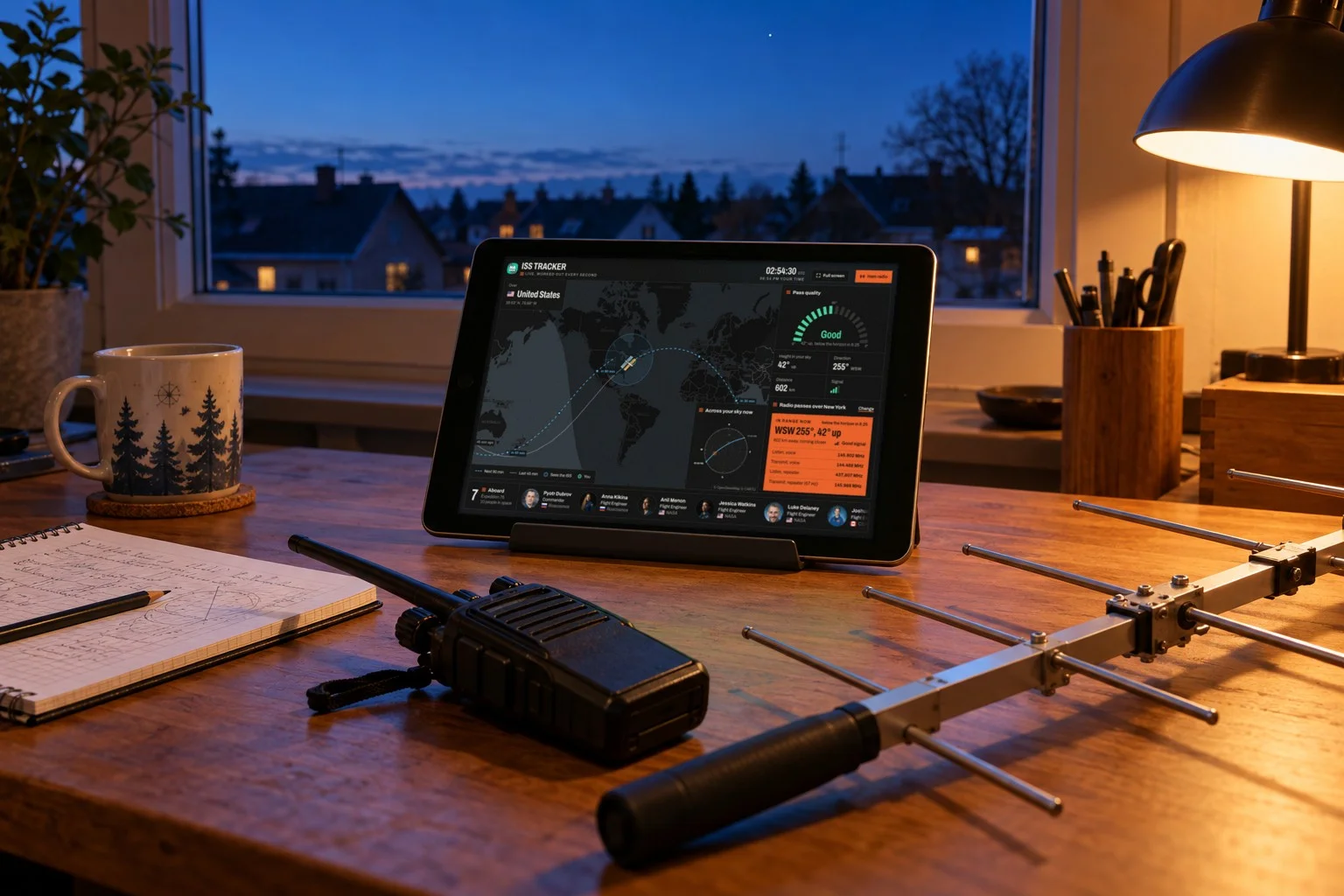
When the International Space Station passes over you, you can listen for the crew on 145.800 MHz FM and hear its crossband repeater on 437.800 MHz with an ordinary dual-band FM handheld. To work the repeater, you transmit on 145.990 MHz with a 67 Hz tone during a pass of about ten minutes.
The ISS Tracker on hakiosk.com, a free tracker from the people behind QSL Buddy, shows when the next pass comes, where to point and which frequency to tune, worked out in your browser every second.
What are the ISS frequencies?
| What | Listen | Transmit |
|---|---|---|
| Crew voice | 145.800 MHz FM (worldwide) | 145.200 MHz (ITU Region 1), 144.490 MHz (Regions 2 and 3) |
| Crossband repeater | 437.800 MHz | 145.990 MHz, 67.0 Hz tone on transmit |
| APRS packet | 437.825 MHz | 437.825 MHz, alias ARISS |
| SSTV events | 437.550 MHz, Robot 36 | — |
Never transmit on the station's downlinks, 145.800 and 437.800 MHz: they are what the ISS sends on. To transmit at all you need your amateur radio licence.
Which ISS radios are on right now?
That changes with the crew's work. Here is what I found on 2 November 2026:
- The crossband repeater is on, in the Columbus module, call sign NA1SS (ARISS status page, 27 October).
- APRS is on 437.825 MHz from the radio in the Russian Service Module, RS0ISS. ARISS-Europe expects it to stay there until the end of the year, except during spacewalks (AMSAT news bulletin, 1 November).
- The radios are switched off for every spacewalk, docking and undocking. The next spacewalk is scheduled for Thursday 5 November 2026 (same bulletin).
- The last SSTV event ended on 26 October, and no new one is listed on ARISS's SSTV events page.
Check the status page before a pass.
When does the ISS pass over me?
The station flies about 420 km up and goes round the Earth in about 93 minutes. On 2 November the tracker listed 12 passes over New York in the next 31 hours, with highest elevations from 13° to 69°. Overhead the station is about 420 km away, at the horizon about 2,350 km, so path loss is about 15 dB lower overhead. With a handheld and its own antenna, try the high passes first.
Set your place in the tracker and it lists the passes for the next 10 days, in that place's time zone, with how long each lasts and how high it climbs. A sky chart draws the next pass across your sky.
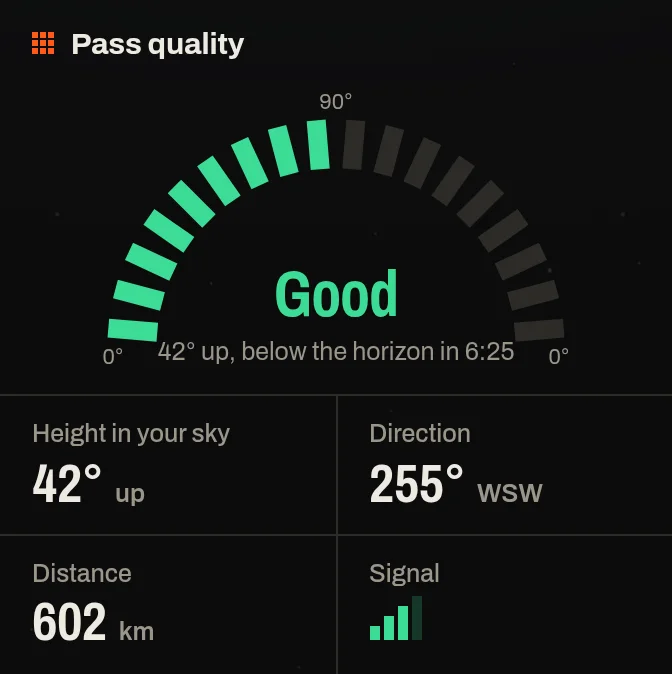
Press Ham radio and the dashboard opens with a Pass quality panel. Between passes it counts down to the next one and says how high it will climb: "to the next pass: fair, up to 22°". Every pass in the radio timetable carries the same rating as one to four signal bars, set by how high it climbs: low below 15°, fair from 15°, good from 30°, excellent from 60°. The rating comes from the orbit, not from a measured signal.
Where do I point the antenna?
While the station is above your horizon, the Pass quality arc, drawn from horizon to horizon over the top, lights up to the station's height in your sky and names the rating. Under it are readouts for height, direction, distance and signal.
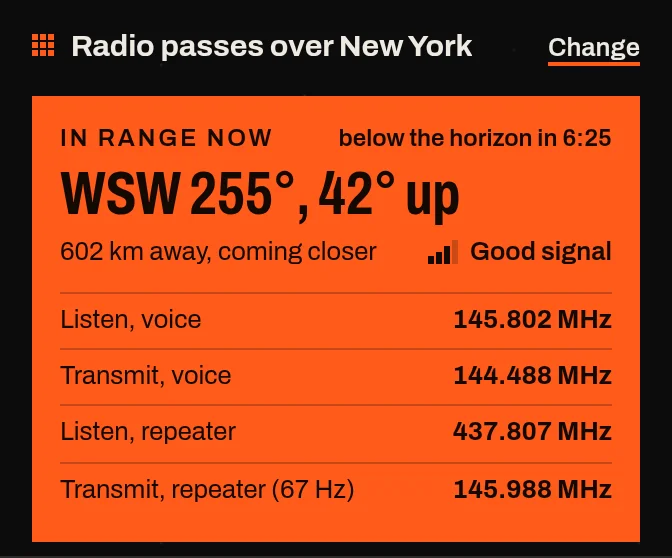
Below it, the In range now card gives the azimuth and elevation to point at, whether the station is coming closer or moving away, when it sets, and the frequencies to tune. The panel and the card update every second, so you can follow the station with a handheld Yagi or a rotator.
How much does Doppler shift the ISS signal?
The shift is the frequency times the speed at which the distance to the station changes, divided by the speed of light. On an overhead pass that speed reaches about 7.2 km/s near the horizon and is zero at the closest point: at most about ±3.5 kHz on 145.800 MHz and ±10.5 kHz on 437.800 MHz. Coming towards you, the station sounds high; moving away, low.
On 2 m, ±3.5 kHz is less than one 5 kHz tuning step either way. On 70 cm, ±10.5 kHz is two steps. So the usual answer for the repeater is five memories that listen on 437.810, 437.805, 437.800, 437.795 and 437.790, stepped down through the pass. Every one of them transmits on 145.990 MHz with the 67 Hz tone.
In ham radio mode, the tracker shows the corrected listen and transmit frequencies for voice and the repeater, recalculated every second from how fast the distance to the station is changing. In the pass above it reads 437.807 MHz to listen, so the memory to be on is 437.805, and 145.988 MHz to transmit.
How do I work the ISS crossband repeater?
Set 145.990 MHz with a 67.0 Hz tone to transmit and 437.800 MHz to listen. Then follow AMSAT's advice for FM satellites:
- Don't transmit if you can't hear the repeater.
- Let a contact in progress finish before you call.
- Don't call CQ. Give your callsign and grid square in phonetics, or call a station you hear.
- Use as little power as works. AMSAT puts it plainly: 5 W from a handheld and a directional antenna is plenty.
- Share the pass. Make your contact and let others have theirs.
Most of the voices you hear on the repeater are other ground stations, not the crew. AMSAT also recommends full duplex where you can, from one radio or two, so you can hear whether your own signal comes back through the repeater.
Can I talk to the astronauts?
Sometimes. The crew's usual waking day is 07:30 to 19:30 UTC, and ARISS says they are most often on the radio about an hour after waking and before sleeping, and at weekends. Listen on 145.800 MHz. When you hear a crew member making casual contacts, call on your region's uplink: the tracker picks 145.200 or 144.490 MHz from the place you set.
You can also listen to ARISS school contacts: 60 to 100 a year, with a radio window of about ten minutes, with the crew on 145.800 MHz. Times and ground stations are on ARISS's upcoming contacts page.
How do I use ISS APRS?
APRS through the ISS is on 437.825 MHz at present, through the alias ARISS. The Doppler shift there is as large as on the repeater downlink. ARISS's live APRS log shows whether the station relayed your packet.
How do I receive ISS SSTV?
SSTV runs as announced events. The last one sent pictures on 437.550 MHz in Robot 36, with 36 seconds of picture and two minutes of pause. New dates are posted on ARISS's SSTV events page.
How do I keep the tracker on a screen in the shack?
The address can carry your place and ham radio mode, and kiosk=1 shows the dashboard alone. On a TV or laptop the Full screen button does the same while the screen stays full, and HAkiosk keeps it full screen on an Android tablet, iPad or iPhone.
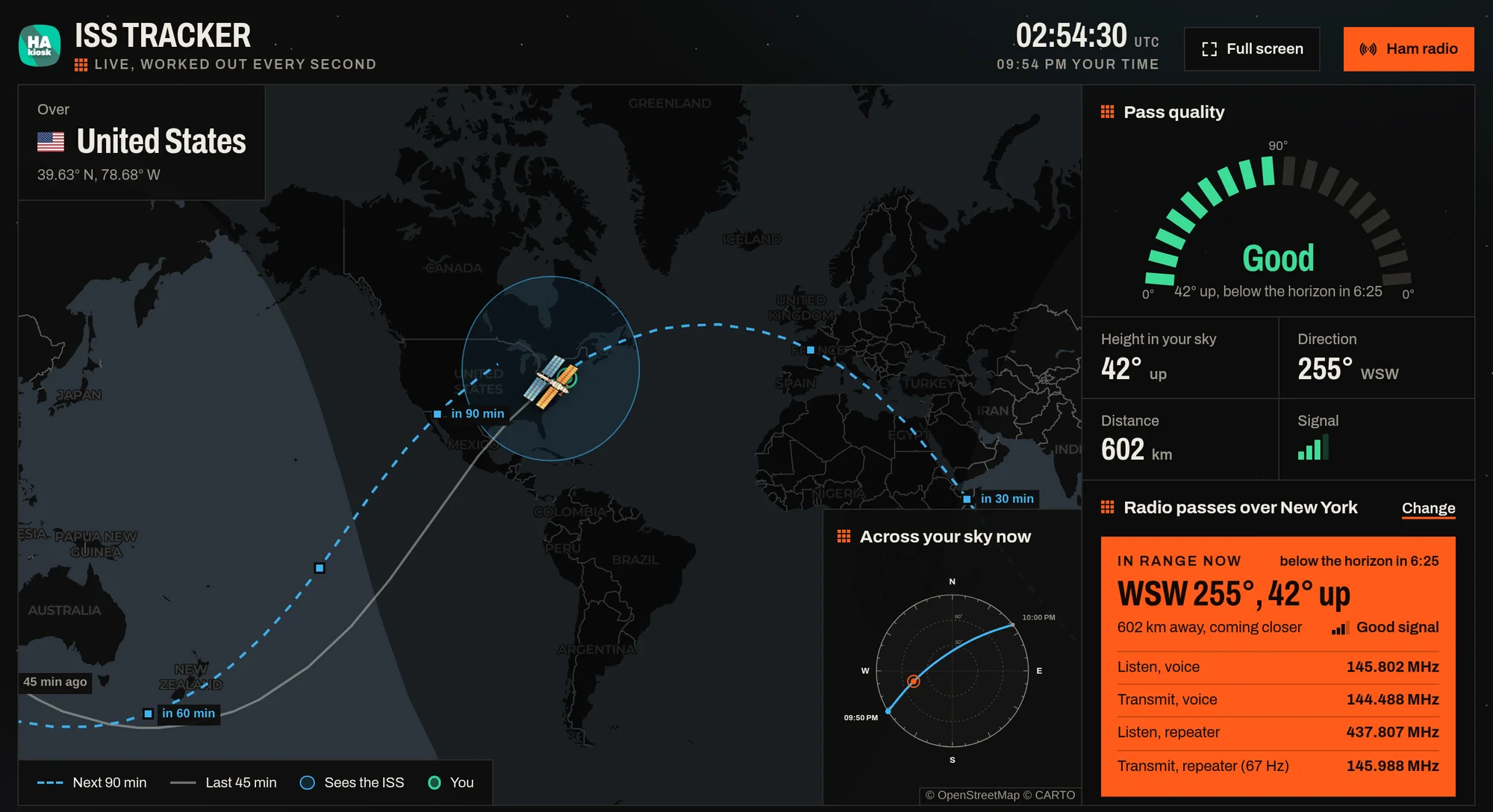
Copy this address and put your own latitude, longitude and place name in it:
https://www.hakiosk.com/dashboard/iss?lat=59.44&lon=24.75&place=Tallinn&hamradio=1&kiosk=1
Then open the ISS Tracker in ham radio mode, pick a high pass, and listen on the repeater memory nearest the tracker's figure, or on 145.800 for the crew.
Map © OpenStreetMap contributors © CARTO. Crew portraits on the tracker: NASA, Roscosmos and CSA, via Wikimedia Commons.