CQ WW SSB 2026: the exchange, your zone, and the log
by Priit ES1TEB5 min read
The phone weekend of the CQ World Wide DX Contest runs from 00:00 UTC on Saturday 24 October 2026 to 23:59 UTC on Sunday 25 October — 48 hours. CW follows on 28–29 November.
You send a signal report and your CQ zone: 59 15 from here in Estonia.
Bands, and who works whom
160, 80, 40, 20, 15 and 10 metres. No WARC bands. You can work any station anywhere, and each one counts once per band. Stations in ITU Region 1 must not transmit above 7200 kHz on 40 m or below 1810 kHz on 160 m during the contest.
The exchange: RS plus your CQ zone
The zone is the CQ zone where your transmitter is — not your ITU zone, and not where your callsign was issued. There are 40. CQ WW publishes the written definitions of every zone and a zone map. Look up where your station actually is: the USA, Canada, Russia, China and Australia span several zones, so a W1 call operating from California sends 3, not 5.
Operating from one place, you send the same zone all weekend. It is not a serial number.
Scoring, in one paragraph
A QSO with another continent is worth 3 points, another country on your own continent 1 point (2 between countries in North America), and your own country 0 points, though it still counts for multipliers. The multipliers are the CQ zones and countries (DXCC plus the WAE list) you work, counted separately on each band. Score = QSO points × (zones + countries). The details are in the CQ WW rules.
Logging it in QSL Buddy
In the contest calendar, the CQ WW SSB row has a Start Session button that opens the setup with the contest chosen and the start set to 00:00 UTC on 24 October. Any other time, Contests → New Contest and CQ World Wide DX Contest - SSB gets you to the same form.
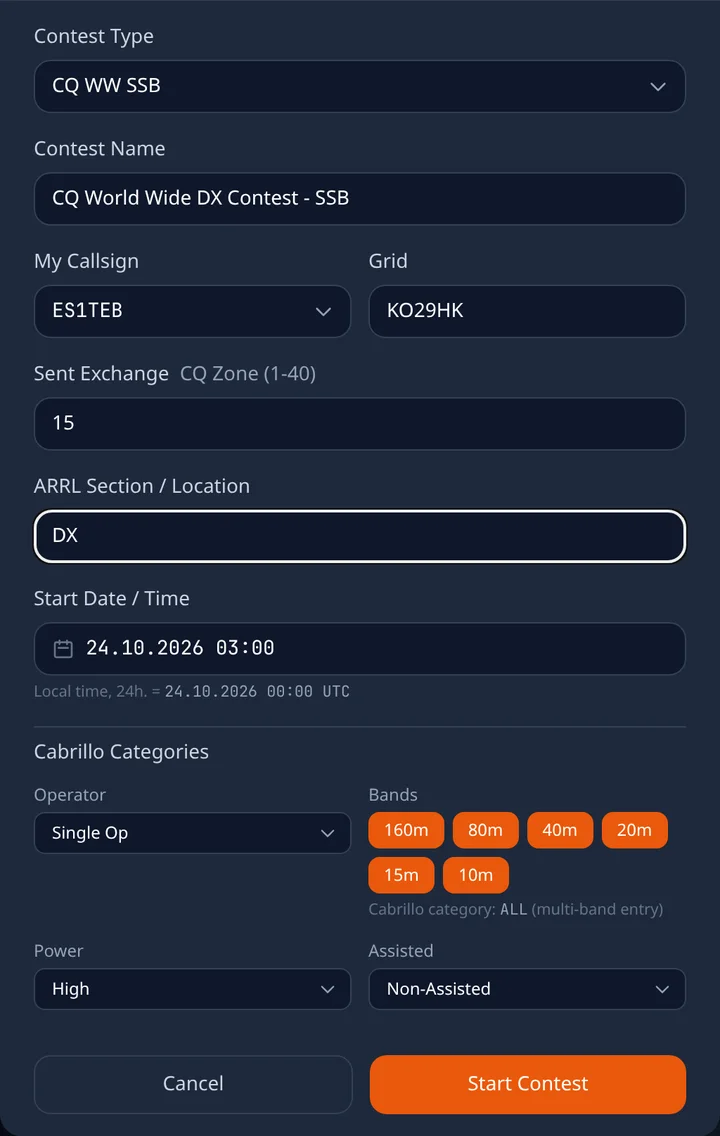
- Fill in your callsign, grid and the Cabrillo categories: operator, bands, power, assisted or not. One band chip makes a single-band entry. In Location, put
DXunless you are in the USA or Canada (your state, province or ARRL section). The form is built for single-op; a multi-op log needs aCATEGORY-TRANSMITTERline added by hand. - Set the sent exchange to your zone,
15for me; the form's05is only an example. It is logged the same on every QSO. Until 22 October a numeric zone was wrongly counted up as 001, 002 … — fixed now, but QSOs logged before then keep the wrong number, so check the sent column of any earlier session. - Log. From the third character the callsign field turns red for a dupe on this band and green if not, and chips show the bands where you worked it before. Space jumps to the zone field for the zone you heard, Enter logs the QSO, Escape wipes a botched entry (or stops a playing voice memory). QSL Buddy shows the station's country but does not look up zones. Partial-call suggestions come from this session's log.
- With CAT over Web Serial, frequency and mode come from the rig. F1 to F8 play the radio's own voice memories — eight on ICOM, five on Yaesu.
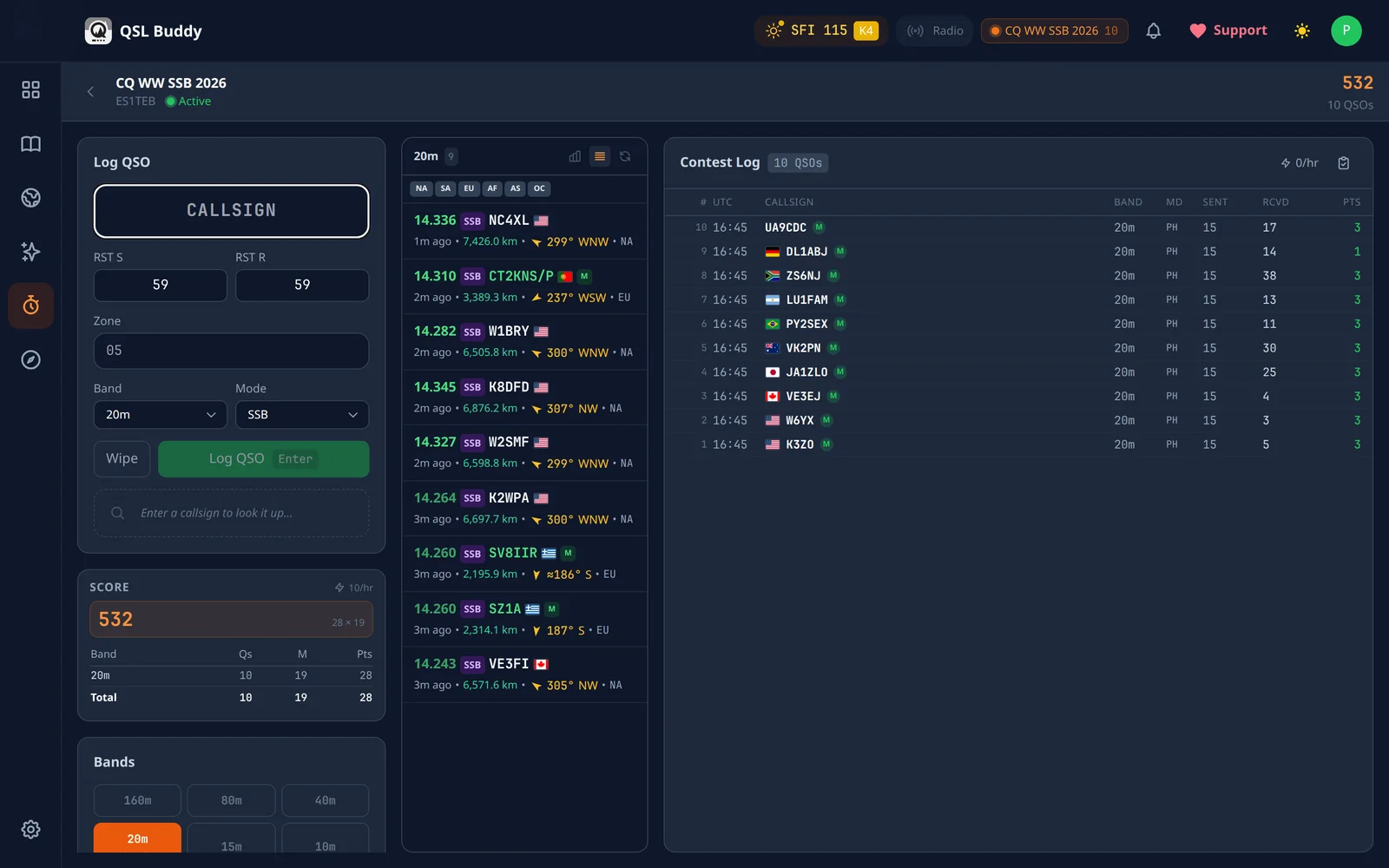
The score panel follows those rules: 3, 1 or 0 points from the two stations' continents and countries (2 inside North America), and a zone and a country counted per band, so one QSO can be two new multipliers. The country comes from the callsign prefix and follows DXCC, so the extra WAE countries CQ WW counts (Shetland, Sicily and the like) show as their DXCC country, and a prefix QSL Buddy does not know is scored as another continent. Treat the panel and the claimed score in the Cabrillo header as a close guide; the log checkers score the QSO lines themselves.
Sending the log
Open Export → Cabrillo and download the file: CONTEST: CQ-WW-SSB, your setup's header, the claimed score, and a QSO: line per non-dupe contact with frequency, PH, date, UTC time, both calls, and RS and zone each way. Without CAT the frequency is the band edge (14000 on 20 m); World and Continent award entries need actual frequencies. Read the file through before sending.
Upload it on the CQ WW log upload page: choose CQ WW SSB, answer the questions about power, assistance and operators, attach the file, check the header it shows and submit. Web upload is the only way in; an e-mail with a tracking number confirms it. The deadline is 23:59 UTC on Tuesday 27 October 2026, 48 hours after the end. Small logs are welcome — they help the log checking.
To keep the contacts in your main log, Merge to Logbook moves the non-dupe QSOs there, where LoTW, QRZ.com and Club Log can take them. Those integrations stay off until you enable each one.
A contest you work that is missing?
If QSL Buddy does not have a contest you work, or something in this one is wrong, tell me.
QSL Buddy is free: no paid tier, no subscription, no trial, nothing about contest logging behind a paywall. 73, and good luck on the bands.